Understanding HTML Tags and Elements
I’m a Computer Science student learning web development by building real projects and writing about what I learn along the way. I enjoy breaking down core web concepts like HTML, CSS, networking, and browser internals in a simple, beginner-friendly way. Currently exploring frontend development, backend basics, and how the web works behind the scenes. I believe consistency beats perfection, and learning gets easier when you explain things in your own words.
When you open any website, what you’re really looking at is HTML.
Not CSS.
Not JavaScript.
HTML is the skeleton of every webpage.
Just like the human body needs bones for structure, a website needs HTML elements to exist at all.
So let’s understand HTML elements in the simplest way possible.
HTML Is the Skeleton of a Webpage
Before colors, animations, or interactions come into play, HTML decides:
What content exists
How content is structured
What is a heading, paragraph, image, or button
Without HTML, there is nothing to style or animate.
What Is an HTML Tag?
An HTML tag is a keyword wrapped inside angle brackets.
Example:
<p>
Tags usually come in pairs:
<p> Hello World </p>
<p>→ opening tag</p>→ closing tag
Tags tell the browser what type of content it is dealing with.
What Is an HTML Element? (Important Difference)
This is where beginners often get confused.
Tag ≠ Element
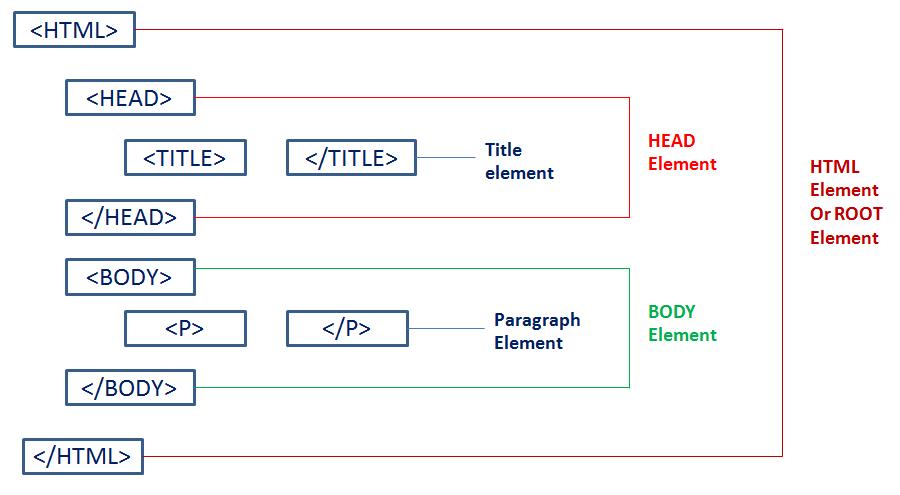
An HTML element includes:
Opening tag
Content
Closing tag
Example:
<p>Hello World</p>
This whole thing is an element.
Simple way to remember:
Tag → the label
Element → the complete box
Tag vs Element (Real-Life Analogy)
Think of a gift box
The word “FRAGILE” written on it → Tag
The box + item inside → Element
The browser cares about the entire box, not just the label.
Commonly Used HTML Tags (You’ll Use These Daily)
Let’s look at the most common and beginner-friendly tags.
<h1> to <h6> – Headings
Used for titles and headings.
<h1>Main Heading</h1>
<h2>Sub Heading</h2>
<h1>is the most important heading<h6>is the least important
Use headings to structure content properly.
<p> – Paragraph
Used for normal text.
<p>This is a paragraph.</p>
Most website text lives inside <p> tags.
<div> – Container (Very Common)
<div> is a box used to group elements.
<div>
  <h2>Title</h2>
  <p>Description</p>
</div>
Divs don’t add meaning — they help with layout and structure.
<span> – Inline Container
<span> is used for small pieces of text inside a line.
<p>Hello <span>World</span></p>
<div>→ big box<span>→ small wrapper
Block vs Inline Elements (Simple Explanation)
Block Elements
Take full width
Start on a new line
Examples:
divph1
Inline Elements
Take only required space
Stay in the same line
Examples:
spanastrong
This difference matters a lot when styling with CSS later.
Simple Before & After Example
HTML
<h1>Welcome</h1>
<p>This is a website.</p>
The browser understands:
Heading
Paragraph
Proper structure
This is HTML doing its job quietly in the background.
Inspecting HTML in the Browser (Highly Recommended)
One of the best ways to learn HTML is to inspect real websites.
Steps:
Right-click on any webpage
Click Inspect
Look at the HTML structure
You’ll start recognizing:
divph1span
This builds confidence fast
Why HTML Elements Matter So Much
HTML elements:
Define structure
Give meaning to content
Are the base for CSS and JavaScript
Exist on every single website
If HTML is weak, everything built on top becomes messy.